
PowerOptimal Elon® Smart Troubleshooting Guide for Electricians v1.7
NOTE: This Troubleshooting Guide is intended for electricians and not general users. Users should please refer to the User Manual, which can be found at www.poweroptimal.com/manuals. Always check the PowerOptimal website for the latest version of this guide.
Unit no. | Development name | Elon® serial no. | |||||
Date | Name: 1st level support person | ||||||
Unit construction status (Works OR Final Completion) | Resident name | ||||||
Reported issue (customer) | |||||||
Reported issue (Level 1 Support) | |||||||
Troubleshooting Steps
No. | Action | Result | Units | |
1 | Open the Elon Smart app. (Download the Elon Smart Water app from the Google Play or Apple app stores if you don’t have it installed on your phone. Make sure that you have the latest version of the app – you can check by searching “Elon Smart Water” in your app store and tapping “Update”.) | 🞏 | ||
2 |
| 🞏 | ||
3 |
(the gear icon) to the right of the thermostat on the app status screen. | 🞏 | ||
4 | Check for any alarms at the bottom of the screen and rectify accordingly (See list of alarms at the end of this guide) | 🞏 | ||
5 | If you cannot access the thermostat from the app, confirm that
| 🞏 | DC closed | |
🞏 | AC closed | |||
6 | If you still cannot access the thermostat from the app, remove the geyser end cover and:
| 🞏 | Wiring correct | |
V DC & correct polarity | ||||
| ||||
 If you don’t have the specific thermostat in your device list, scan its QR code (on the house DB or on the thermostat itself) to add it by tapping the + button in the Elon Smart app.
  Open the Thermostat Settings screen by tapping the Settings button
 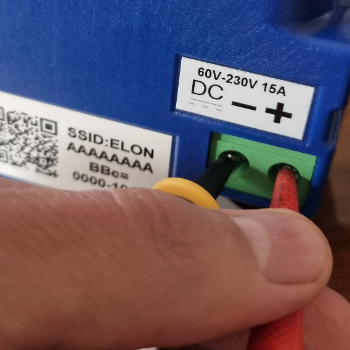 Check using a voltage meter that AC voltage is present on the AC screw terminals (Figure 2).