
PowerOptimal Elon® 100 User Manual v2.20

PowerOptimal Elon® 100 User Manual
Version date: 2025/12/28
Enquiries: [email protected]
Address: Postnet Suite 21
Private Bag X21
Tyger Valley
7536
Please note: Always check the PowerOptimal website for the latest version of this manual.
Patented: ZA2019/02129

SAFETY WARNING
Refer to the PowerOptimal website for the following:
 Elon® 100 Installation Guide & Quick Reference User Guide
 Online User Instructions Video
 Online Elon® Basic Training Course
https://moolmaninstitute.com/p/elon-course
Table of Contents
1.3 Deciding on size of Elon® system (basic guide) 5
2.2 Mains and solar indicator lights 7
2.5 How to maximise your savings 10
3.1 Solar PV module maintenance 11
4. What to expect in terms of performance 12
4.2 Impact of location and seasons 13
5.1 Troubleshooting Guide for Users 15
5.2 Troubleshooting Guide for Electricians 18
Appendix A. IEC/SANS and EMC Test Certificates: Elon® 100 19
1. Introduction
Thank you for buying the PowerOptimal Elon® 100 solar PV water heating unit! You can look forward to many years of savings and free energy from the sun.
1.1 System overview
The PowerOptimal Elon® 100 operates on a very simple principle: it enables you to connect solar PV modules directly to a standard geyser with alternating current (AC) heating element and AC thermostat, with no need for an inverter. It uses the water in your geyser as a battery to store solar energy in the form of heat.
You can connect the system completely off-grid or connect it to your existing grid AC power supply. Connecting the system to the existing grid supply allows for grid power backup in case of cloudy / overcast days, or where you use more hot water than your solar PV array can generate.
Note: the system is designed in such a way that there is no possibility of solar array-produced electricity feeding back into the grid. For municipal registration purposes it is classified as "off-grid".
Below is a simplified layout of the main components of the water heating system.
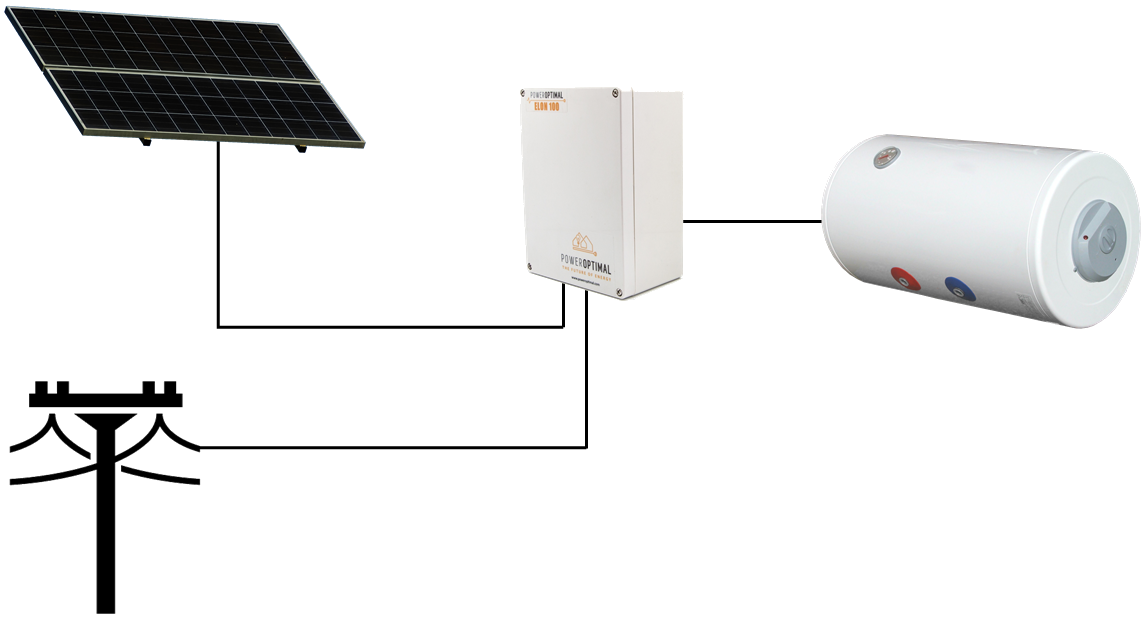
An array of solar modules (a string of 3 to 6 solar modules connected in series, or two parallel strings of 4, 5 or 6 solar modules each) is connected to the Elon® 100. Grid electricity is also connected to the Elon® 100.
The Elon® 100 is connected to the geyser element and thermostat.
When the solar modules are producing electricity, the Elon® 100 feeds this into the geyser element to heat water, until the water reaches the temperature setting on the thermostat.
The Elon® 100 controller dial setting (see Section 2.3) will determine if or when the Elon® 100 will boost the water heating with grid electricity.
1.2 Main system components
The main components of the system are as follows:
1.3 Deciding on size of Elon® system (basic guide)
The table below provides a basic guide to selecting the size of your Elon® system based on number of people in the household and/or hot water use. The Installation Manual (which you can download from www.poweroptimal.com/manuals) contains a more detailed guide.
HOW MANY SOLAR PV MODULES DO I NEED?
Solar PV array size
(kWp)
Showers per day*
50%+ of daily hot water use provided for how many people?
How many people off-grid for hot water?
Typical number of solar PV modules
1 – 1.6







2 - 3 modules
1.6 – 2











3 - 4 modules
2 – 3















4 - 5 modules
3 – 4
(two parallel PV strings)



















6 - 8 modules
* 6-minute showers at 40 ºC with 8 litre/min (low-flow) showerheads
WHAT SIZE GEYSER ELEMENT IS THE BEST MATCH?
Solar PV array size
(kWp)
Best matching geyser element size
(kW)
2nd choice geyser element size*
(kW)
Geyser (water tank) size
(litres)
1 – 1.6
4
3
100 - 200
1.6 – 2
3
4 or 2
100 - 200
2 – 3
3
4
150 – 300
2 – 4
(two parallel PV strings)
4
NA
200+
* Second choice element size would reduce efficiency by 10 – 20%.
2. Operation

Instruction video: www.poweroptimal.com/elon100
Refer to our easy-to-understand instruction video on how to use the Elon 100.
2.3 Control dial
2.2 Mains & solar indicator lights
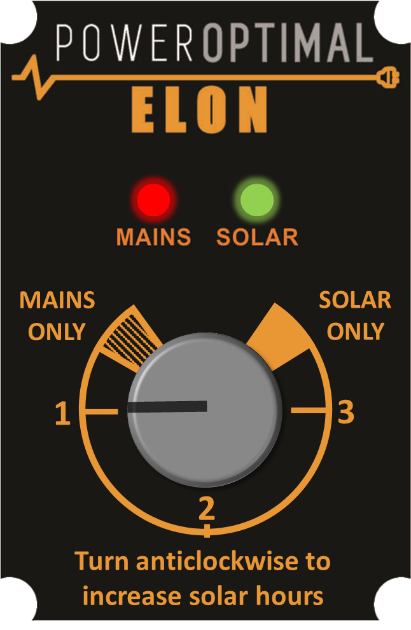
Your Elon® 100 has a controller that is typically installed next to your DB (distribution board). The controller has two main functions:
Indicating heating activity and status through the mains (red) & solar (green) indicator lights (Section 2.2)
Setting the timing on the control dial (Section 2.3)
2.2 Mains and solar indicator lights
The Mains & solar indicator lights indicate the following conditions:
Lights
Meaning
⏺⏺
Green light ON
Geyser on temperature
 ⏺⏺
⏺⏺
Green light flashing
Heating with solar
⏺⏺
Red light ON
Mains power available (power to Elon® unit on)
 ⏺⏺
⏺⏺
Red light flashing
Heating with mains
⏺⏺
Both lights ON
Geyser is on temperature. Mains power available (mains power to Elon® unit on)
 ⏺⏺
⏺⏺
Red light ON & Green light flashing
Heating with solar. Mains power available (mains power to Elon® unit on)

 ⏺⏺
⏺⏺
Red & Green light flashing fast
Isolation fault (contact electrician)
⏺⏺
Both lights OFF
No power to unit (for example: no sun plus a power failure, or no sun plus geyser breaker at DB board is switched off) OR supply voltage outside specifications
2.3 Control dial settings
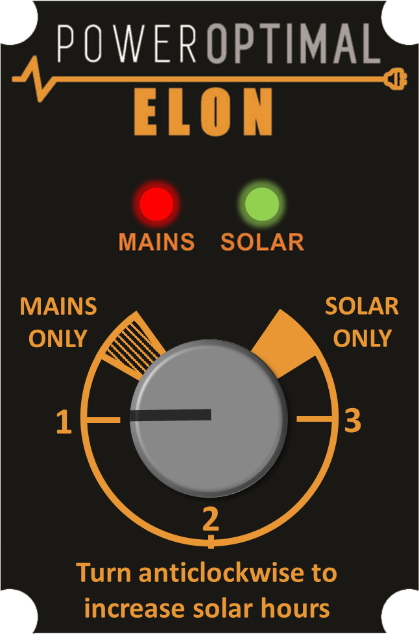
Time on Mains*
Time on Solar*
24-Hour Clock
MAINS ONLY
24 hr
Never

1
12:00
to
08:00
08:00
to
12:00
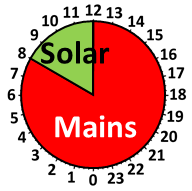
2
14:30
to
05:30
05:30
to
14:30
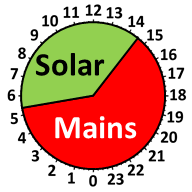
3
17:00
to
03:00
03:00
to
17:00
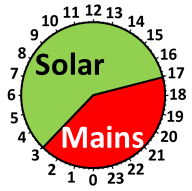
SOLAR ONLY
Never
24 hr
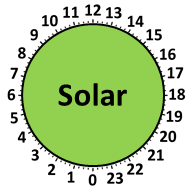
* Times are approximate – will vary slightly with season and location
Think of the water in your geyser as a battery that can store energy in the form of hot water. To charge the battery (or heat the water) with solar energy during the day, it must cool down a bit in the morning. In other words, the water must be below its setpoint temperature by the time the sun comes up.
The Elon® achieves this by switching off mains power at some time in the morning, while you are still using hot water from the geyser. The table above indicates approximate switching times for different dial settings.
As you can see, as you turn the control dial from “MAINS ONLY” to “SOLAR ONLY”, the time period during which mains power is allowed to heat the water decreases to zero.
When the control dial is set to "MAINS ONLY", your geyser will use mains power 24 hours a day (in other words, it will never switch to solar power). The geyser will behave the same as any standard geyser.
Why would I ever want to set the control dial to “MAINS ONLY”?
Here are some example reasons why you might want to set the control dial to “MAINS ONLY”:
If you only use hot water early morning and in the evenings, you can set it just outside the “SOLAR ONLY” zone (around the “3” mark) to benefit from a longer solar energy heating period (and save more money).
When the control dial is set to “SOLAR ONLY”, the Elon® 100 will ONLY use solar power to heat water.
If you set the control dial to “SOLAR ONLY”, you can increase the geyser thermostat temperature to 60 ºC to get maximum benefit from your solar array installation. We do not recommend setting the thermostat temperature above 60 °C. Remember to reduce the thermostat temperature again if you reduce the efficiency setting.
 Warning: Do not set thermostat temperature above 65 ºC due to increased scalding risk. Be careful when opening hot water taps located close to your geyser. You can install a thermostatic mixing valve to reduce the risk of scalding – ask your plumber.
Please note: DO NOT install a separate timer on the AC side to try and regulate mains power use. Use only the Elon’s control dial to control mains power use. If you install a second timer, it will work at cross-purposes with the Elon and you will reduce performance and hot water availability.
Can I boost the water temperature with a single grid heating cycle whilst on “SOLAR ONLY” or any of the other settings?
The answer is YES. To boost water temperature to setpoint with a single grid heating cycle, turn the dial into “MAINS ONLY” until the red light starts flashing. Then turn the dial back to whatever previous setting it was on (or whatever setting you wish it to be on after the single grid heating cycle). The Elon will complete the single grid heating cycle (in other words, heat the water with grid power until it reaches the temperature set point) and then return to whatever setting you leave the control dial on.
2.4 Holiday settings
What setting should I use when I go on holiday?
You can either switch off both solar and mains power OR you can switch off mains power.
Setting
How to set it
Benefits & comments
Mains power off
Turn dial to SOLAR ONLY
You will have hot water on your return, and it will cost you nothing. It will also prevent Legionella growth in your geyser.
Both Mains & Solar power off
Turn dial to MAINS ONLY and switch off geyser at distribution board
Remember to switch system on when you return.
2.5 How to maximise your savings
Control dial
The best way to maximise your savings is to set the Elon® control dial to “SOLAR ONLY”. This will ensure that the unit will never use grid (mains) power for heating water. You can still boost with mains power (for example on a cloudy day) by turning the dial to "MAINS ONLY" if needed.
However, the "SOLAR ONLY" setting will only be feasible if you have enough solar PV modules for your household (see the table in Section 1.3 above).
For most people, setting the dial at "3" will yield the most savings whilst maintaining hot water availability mornings and evenings.
 Please note: The water in your geyser should be heated to 60 °C at least once a week to prevent Legionella bacterial growth[1]. If you have heavily overcast weather for more than a week on the SOLAR ONLY setting, turn the dial clockwise outside of the SOLAR ONLY zone for a day in order to supplement the solar water heating with grid electricity to reach the thermostat temperature setting.
When is the best time to shower?
If the control dial is set to “SOLAR ONLY”, it is best for people in the household to shower either in the morning or in the evening, but not both. (If you shower in the evening, cold water will mix with the remaining warm water overnight, and you will have cold water the next morning. If you do not shower again in the morning, the water will be heated during the day.)
If the control dial is set to any setting outside “SOLAR ONLY” or "MAINS ONLY", it is best to shower in the morning for maximum savings.
General hot water energy saving tips
South Africa is a water-scarce country – reducing hot water use saves both energy and water!
3. Maintenance
The Elon® 100 has been designed to last for a very long time and has no moving parts aside from three electrical relays. No maintenance is required on the Elon® 100.
3.1 Solar PV module maintenance
It is recommended that a qualified electrician inspect your solar PV installation at least once a year.
4. What to expect in terms of performance
4.1 Hot water production
Heating water takes a LOT of energy. A household geyser can use up to 40% of a house’s electricity. Heating a single 200 litre geyser from 15 °C to 60 °C will use over 10 kWh. This is about the same amount of energy burnt by a person running a distance of over 100 km at 10 km/hr, or enough energy to watch more than 120 hours of TV[2].
The more solar panels you have on your roof, the faster the Elon® 100 system will heat your water. Typically, the number of panels has been selected to heat water over most of the sunlight hours (from morning to afternoon). This will be slower than heating water using grid electricity. So you can expect a gradual temperature rise from morning to afternoon.
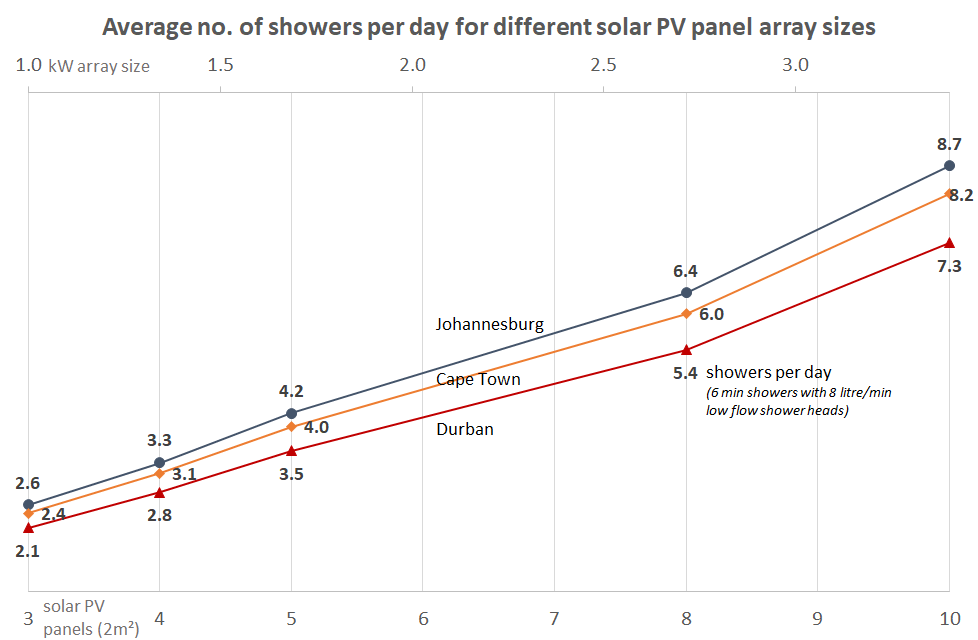
As one would expect, hot water production increases with increase in number of solar panels. Keep in mind that these numbers are averages over the year. This means that you should expect a lower number in winter and a higher number in summer.
4.2 Impact of location and seasons
The amount of energy from the sun depends on your location, the time of year as well as the orientation of your solar panels. The best direction for panels in South Africa is to face north, at an angle of about 25 to 35° from horizontal.
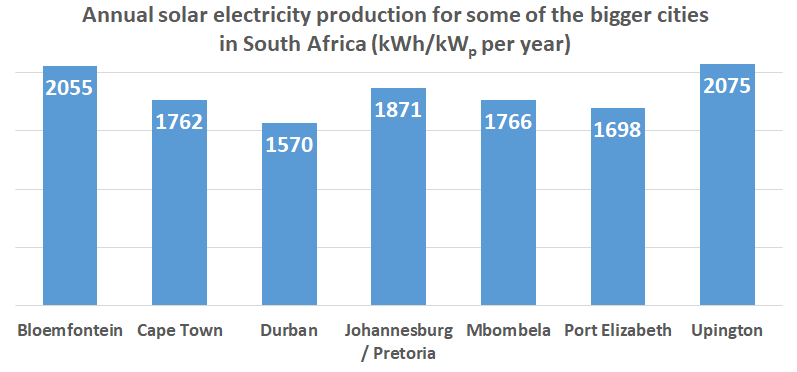
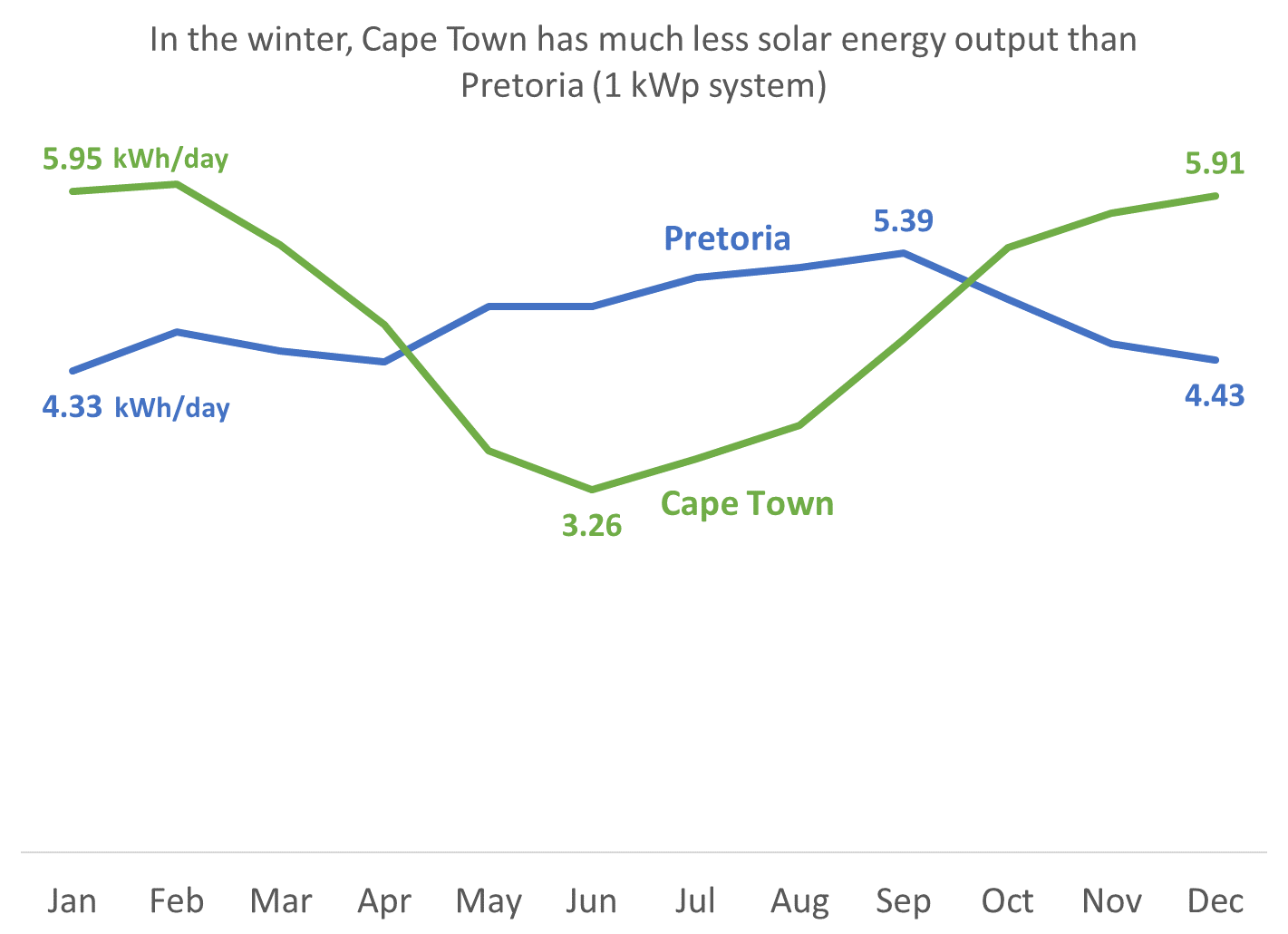
Although Gauteng (Johannesburg / Pretoria) & Cape Town may seem quite similar in terms of total solar energy per year, Cape Town has winter rainfall and Gauteng has summer rainfall. This leads to Cape Town having much lower solar electricity production than Gauteng in winter (see the below graph).
4.3 Payback period
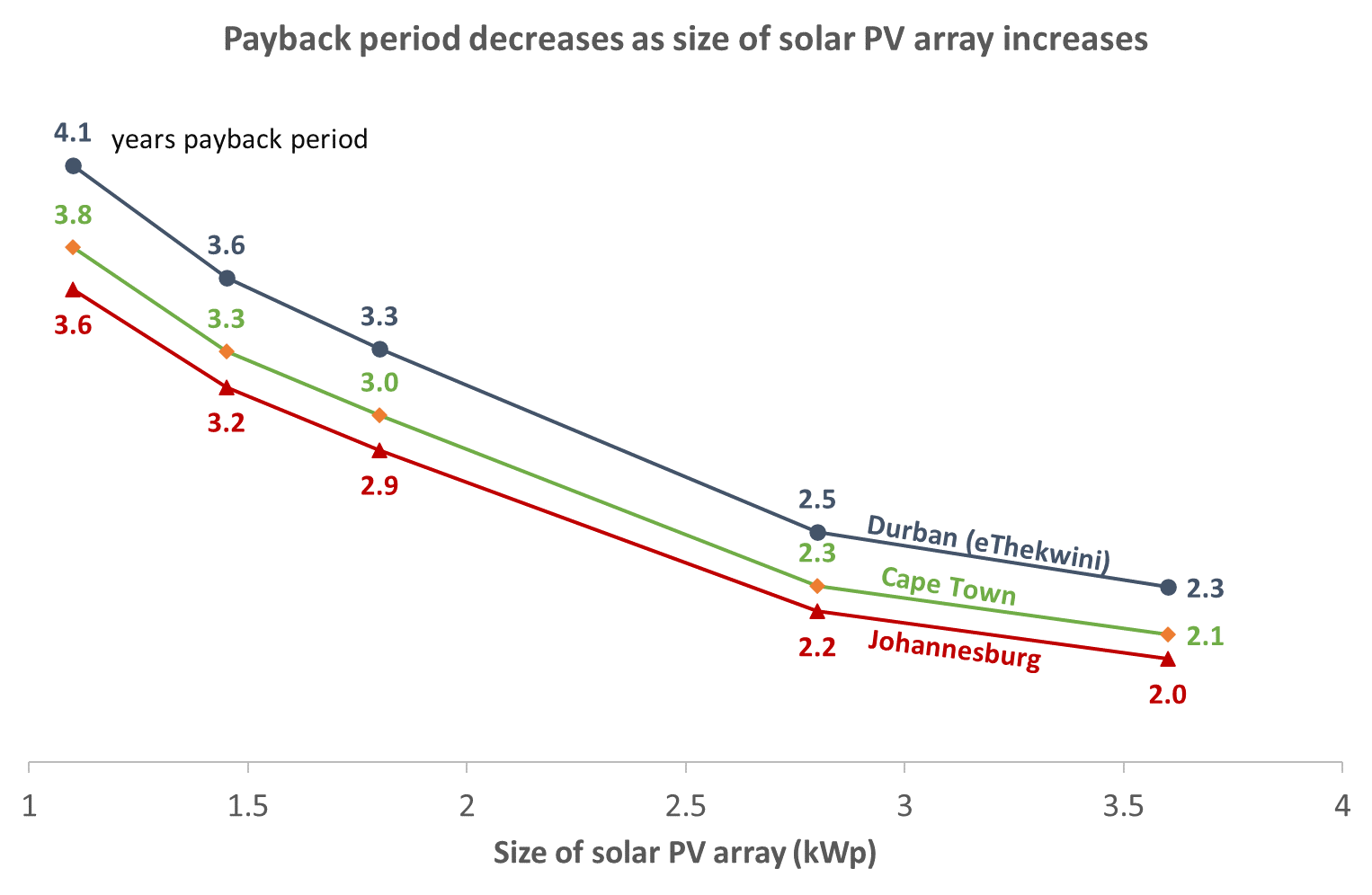
As can be seen from the graph above, payback period decreases as number of solar panels increases, and is also different for Johannesburg, Cape Town and Durban[3].
The reason that payback period improves (decreases) as number of solar panels increases, is because there are some fixed costs (such as engineering design & safety components) and some costs that do not scale linearly with array size (such as labour, wiring, mounting kit costs, etc.).
5. Troubleshooting
5.1 Troubleshooting Guide for Users
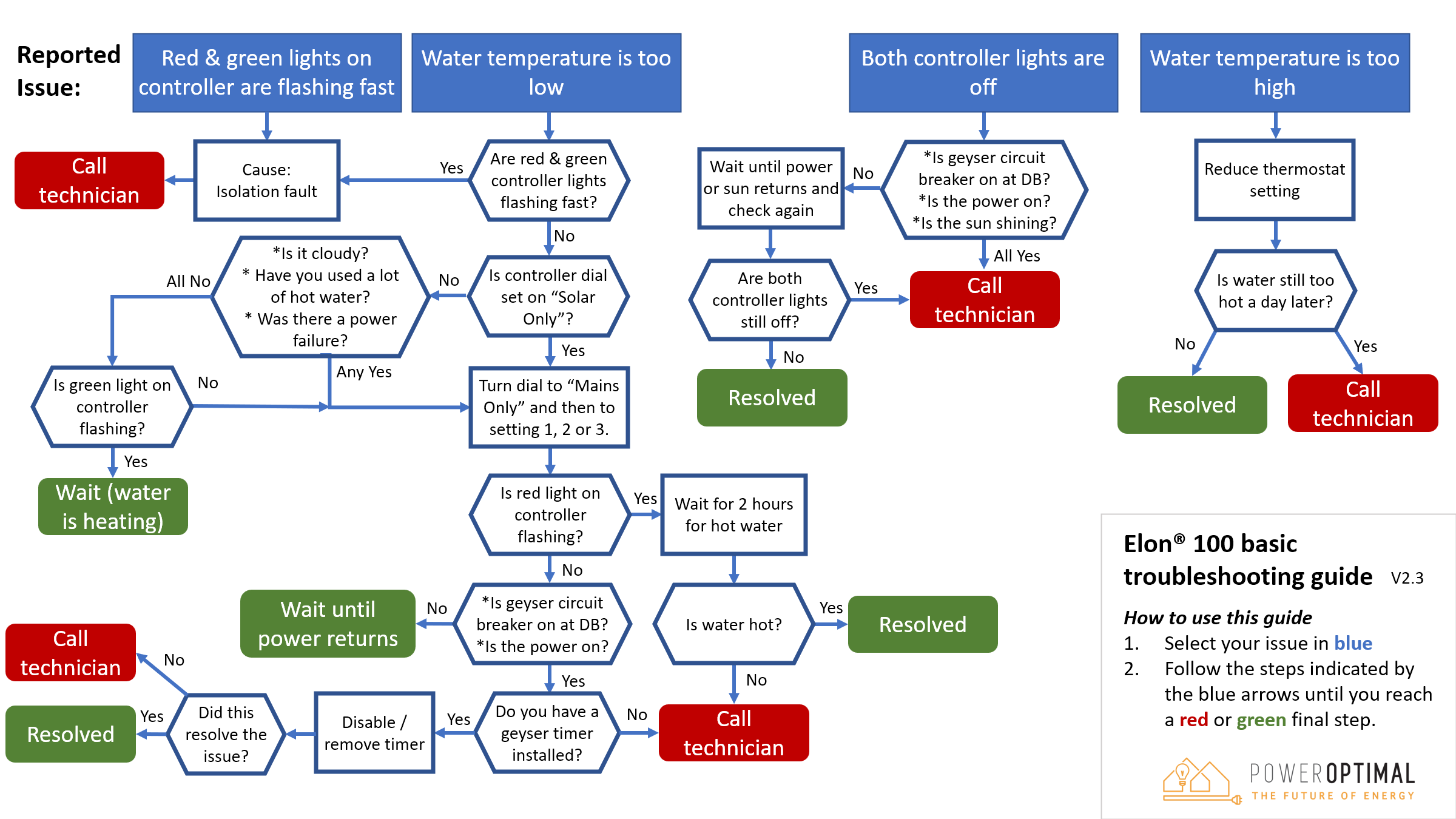
Below you can find the same information with some further detail in table format. If you cannot resolve the problem using the diagram or table, please contact your installer.
Issue
Possible causes
What to do
Water temperature too low
Reduce hot water use (2.5) OR
Add additional solar modules to your solar installation (first consult with your installer)
Water temperature remains low after turning dial to "MAINS ONLY". (Note: the red LED light should start flashing once dial is turned to “MAINS ONLY”, indicating that the water is being heated.)
Water temperature too high
Open the cold water tap first
OR
Install a thermostatic mixing valve
Hot water production is lower than it used to be
Both indicator lights off
Red or green indicator light flashing very fast
5.2 Troubleshooting Guide for Electricians
NOTE: This Troubleshooting Guide is intended for electricians and not general users. Users should please refer to Section 5.1.
Things to Remember
Troubleshooting Steps
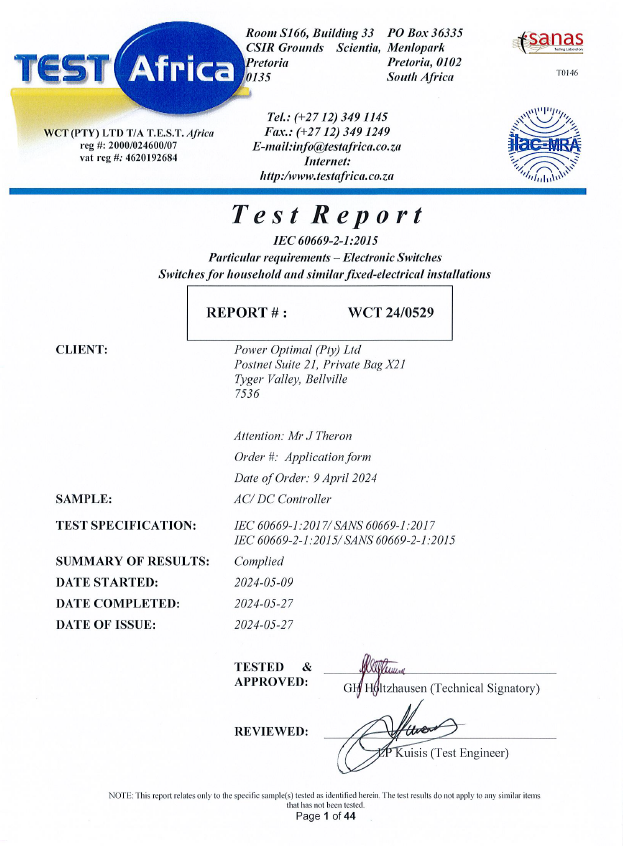
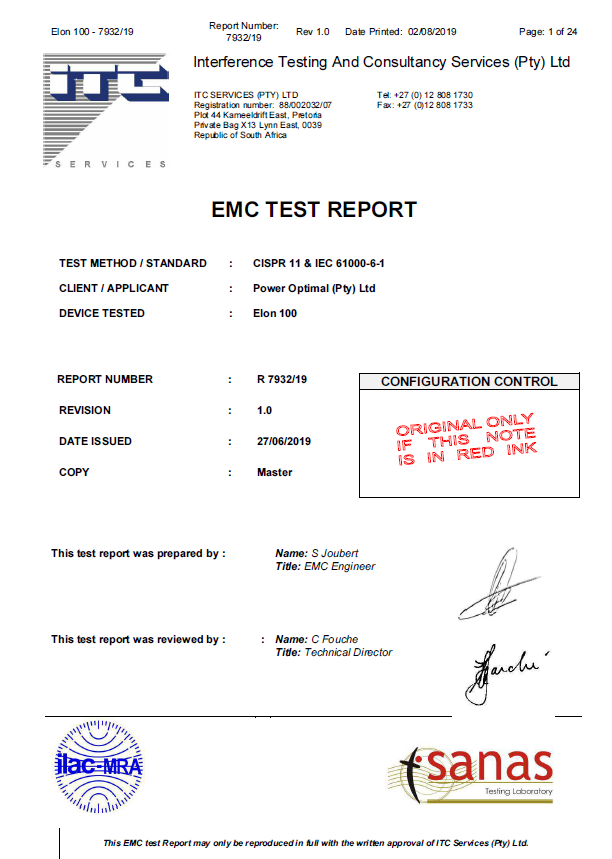
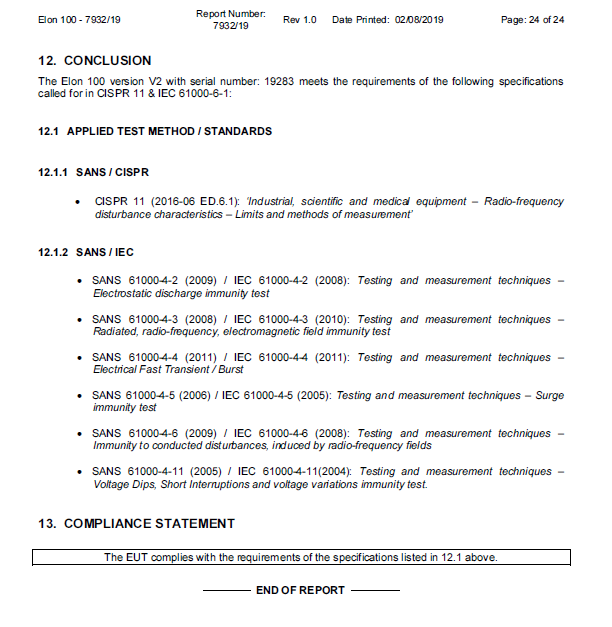
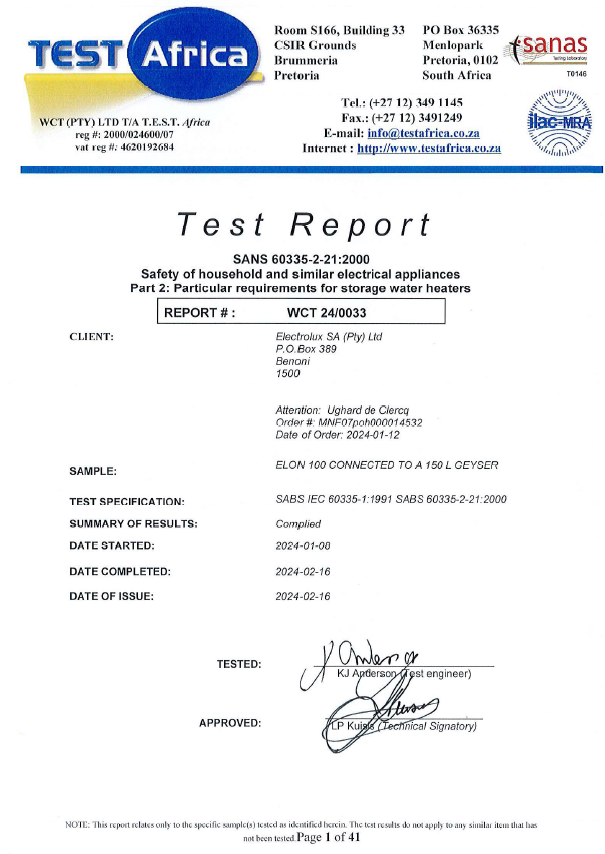
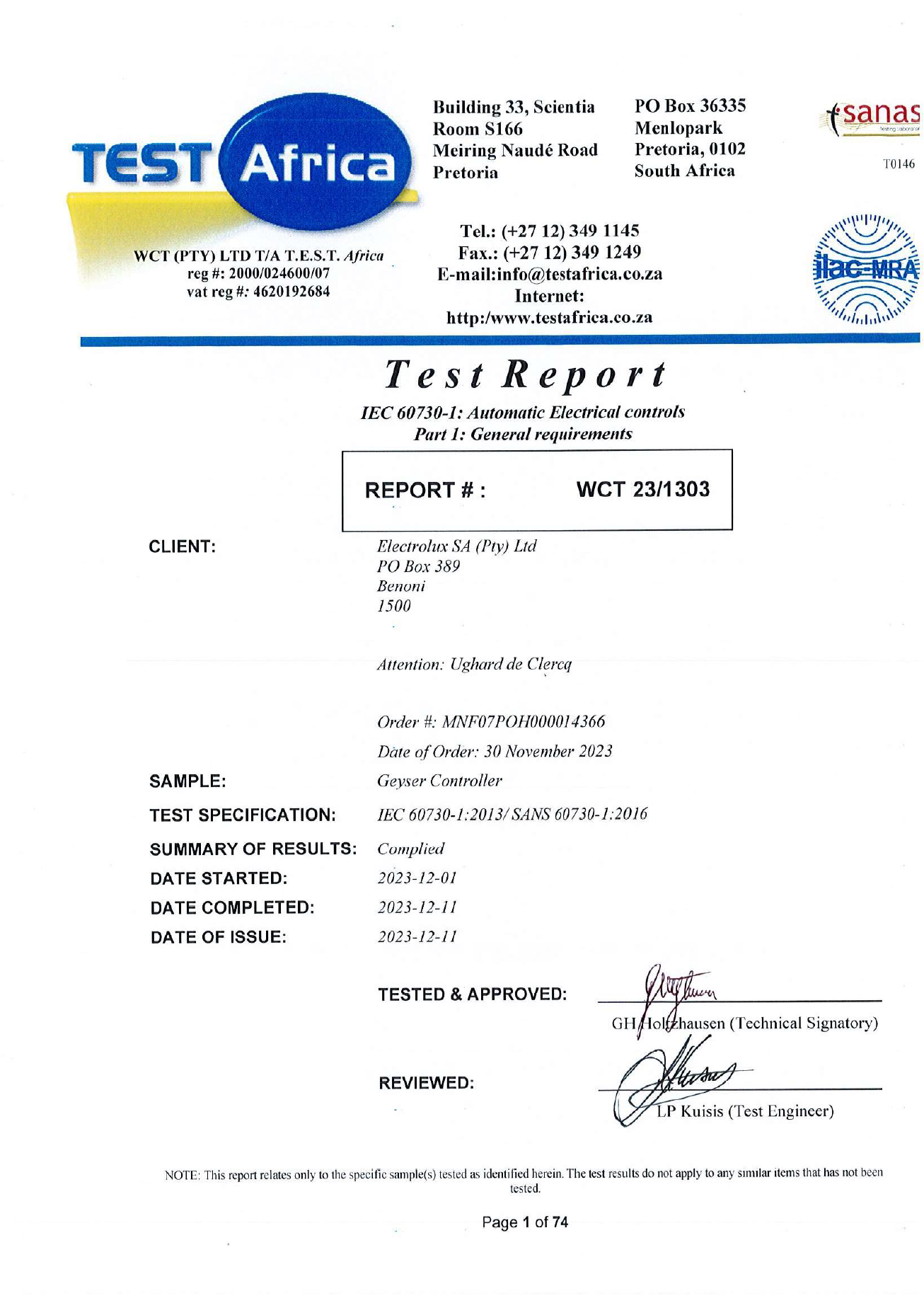
Appendix A. IEC/SANS and EMC Test Certificates: Elon® 100
Appendix B. Warranty
If the PowerOptimal Elon® 100 (“the Product”) is found to be defective, you will be entitled to a repair or replacement within 2 (two) years of the date of delivery of the Product to you. Please keep your receipt as proof of purchase. If you are a consumer as defined in the Consumer Protection Act No. 68 of 2008 (“the CPA”), you will be entitled to such remedies as are made available under the CPA in relation to the return of goods.
PowerOptimal will not have any liability or obligation to you where the Product has been subjected to abuse, misuse, improper use, improper testing, negligence, accident, alteration, tampering or repair by a third party.
To the maximum extent permitted by applicable law, in no event shall PowerOptimal be liable for any special, incidental, indirect, or consequential damages whatsoever, including, without limitation, damages for loss of business profits or business interruption, arising out of the use or inability to use this product.
Please note that this unit must be installed by an electrical contractor registered with the Department of Labour. Failure to do so may invalidate this warranty. Please keep the CoC (Certificate of Compliance) issued by the electrical contractor on completion of the installation.
Appendix C. Terminology
AC Alternating Current – an electric current that reverses its direction many times a second at regular intervals, with voltage typically varying in the form of a sine wave.
CoC Certificate of Compliance – to be issued by the electrician installing your Elon® 100 system
CPA Consumer Protection Act No. 68 of 2008
DB Distribution board – the main electrical distribution board / panel in your home, containing circuit breakers and switches.
DC Direct Current – an electric current flowing in one direction only. Solar PV modules produce direct current electricity.
Geyser South African term for a water heater
IEC International Electrotechnical Commission
kWh A derived unit of energy equal to 3.6 MJ (megajoules). The amount of energy used by a 1 kW electrical device over a period of 1 hour.
kWp or Wp The peak power rating in kilowatt (kW) or watt (W) of a solar module or array – i.e. the output power achieved under full solar radiation. This is usually reported at STC and NOCT.
PV Photovoltaic – referring to the production of electric current at the junction of two materials exposed to light.
SANS South African National Standards
Notes
See for example: http://www.eskom.co.za/sites/idm/Documents/Legionaires_Fact_sheet_hot_water_bacteria_simple_facts.pdf and http://standards.nsf.org/apps/group_public/download.php/30413/How%20to%20Avoid%20LD%20at%20Home.pdf ↑
46” OLED TV at 82W. ↑
Calculations based on actual Elon performance, assuming a 20% reduction due to non-optimal user behaviour, an initial electricity tariff of R3/kWh and an annual electricity price increase of 8%. ↑